

After a day of removals, estimates, and crew calls, keeping your Google listing current can slide to tomorrow. The account itself costs nothing: tree service Google Business Profile management can be handled without a Google fee, though keeping details and reviews current still takes time. Your profile should show the services, hours, and service area customers need to make a decision.
If you run a tree service, you shouldn’t have to guess what to update or how to build a steady flow of recent reviews. This guide explains what Google charges, how to manage profile details and review responses, and how to create a practical routine for requesting customer feedback.
You’ll also see what to revisit when your hours, services, or seasonal schedule changes. A current profile won’t replace quality tree work or prompt phone responses. It gives potential customers useful details to review before calling about tree removal, stump grinding, or storm-damage cleanup.
Key Takeaways
- Google doesn’t charge to create and manage a Business Profile, but keeping it accurate takes regular attention.
- Use a consistent process to respond to reviews and handle customer feedback professionally.
- Keep profile details current when your services, hours, or service area change, and maintain access to your business data.
- Use real job photos and a repeatable follow-up process to keep your profile active and build a steady stream of customer reviews.
- Decide whether to manage the profile yourself or get help based on the time available and the work needed to keep your crews booked.
Responding to customer reviews
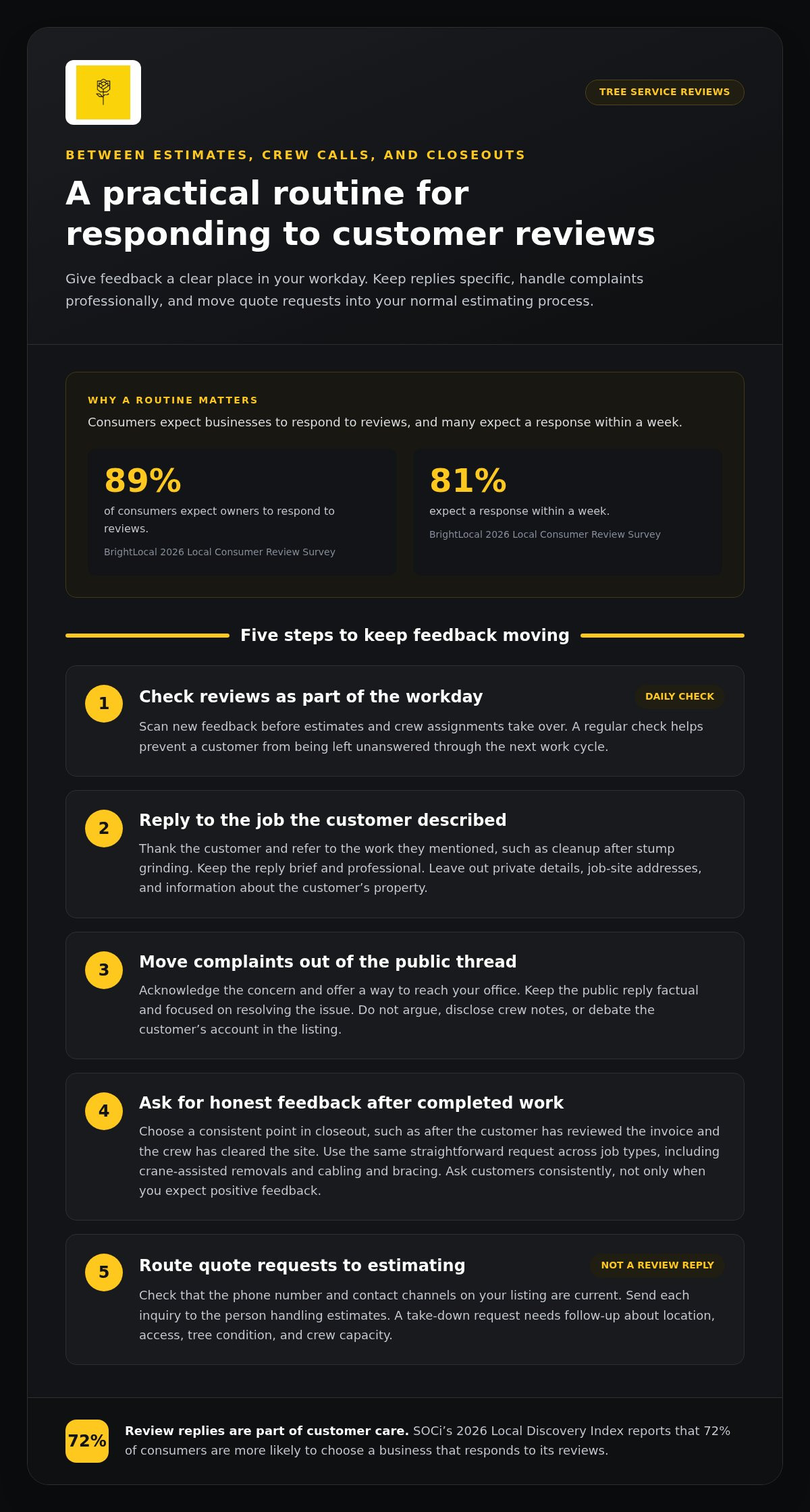
- Set a daily review check that fits your dispatch routine. Open your Google Business Profile and scan new feedback before the day’s estimates and crew assignments take over. BrightLocal’s 2026 Local Consumer Review Survey reports that 89% of consumers expect owners to respond to reviews. The same survey reports that 81% expect a response within a week. A regular check helps you avoid leaving a customer unanswered through the next work cycle.
- Reply to the specific job instead of using a copied script. If a customer praises your crew’s cleanup after stump grinding, thank them and refer to the work they described. Keep the reply brief and professional. Don’t include private details, job-site addresses, or information about the customer’s property. A useful response shows future customers that you read the review and understand what happened on the job.
- Handle complaints without arguing in public. Acknowledge the concern, then move job-specific discussion to a direct conversation. For example, if a customer disputes the cleanup after storm-damage work, say you want to understand the concern and provide a way to reach your office. Don’t disclose crew notes or debate the customer’s account in the listing. Keep the public reply factual and focused on resolving the issue.
- Ask for honest feedback after completed work. Choose a consistent point in your closeout process, such as after the customer has reviewed the invoice and the crew has cleared the site. Send the same straightforward request to customers across job types, including crane-assisted removals and cabling and bracing. Don’t ask only customers you expect to leave positive feedback. A consistent, fair process builds a more representative record over time.
- Separate review replies from quote requests. Check the phone number and contact channels shown on your listing, then route each request to the person handling estimates. A customer asking about a take-down needs a response tied to location, access, tree condition, and crew capacity, not a public review reply. SOCi’s 2026 Local Discovery Index reports that 72% of consumers are more likely to choose a business that responds to its reviews. Make review responses part of the workday, while quote requests move promptly into your normal estimating process.
A Marketing Science study of hotels on TripAdvisor found that properties that began responding to reviews saw ratings rise by 0.12 stars. That finding offers another reason to make replies a regular part of customer care: a thoughtful response can contribute to how people assess a business, even when the review describes a difficult job.
Google Business Profile organization accounts allow business owners to keep replying to reviews directly. Connect access to the person responsible for monitoring feedback, so the process continues when staff responsibilities change. A consistent approach helps ensure customers receive a clear, considered reply instead of being ignored.
Accessing, exporting, and managing profile data
Track calls and quote requests in your customer database, then record which inquiries become booked jobs. Google Business Profile data can show activity, but your call log connects that activity to estimates, close rates, and revenue.
- Keep profile ownership tied to a business-controlled Google Account. Use an account controlled by an authorized representative, not a former employee’s personal login. A Google Account can use an existing email address, so a Gmail address isn’t required. Keep sign-in and recovery details with your business records. That way, a staffing change won’t leave your listing dependent on someone who no longer handles estimates.
- Give each manager access suited to their work. During onboarding, list who handles reviews, profile details, or reporting, then assign access through Google Business Profile. Don’t share one password across the office and field crews. If an employee leaves or changes roles, update their access. For multiple locations, Google Business Profile organization accounts let agencies manage permissions across locations without changing each profile individually.
- Request access instead of creating a duplicate listing. Ask the current profile owner to add your Google Account as a manager. If you don’t know who owns the profile, use Google’s profile access request process and identify the listing accurately. Make sure the request refers to the correct business name and address or service area. A duplicate profile can split customer feedback and confuse people requesting estimates.
- Export a copy of your Google Account data for business records. Google allows business entities to export a copy of their account data, including applicable Business Profile data, at any time. Store the export with your other customer and marketing records, and note when you created it. An export is a record, not a substitute for current profile access. Keep ownership and manager permissions in place so someone can still update the listing.
- Track each contact from first call to booked job. Add a source field to your call log or customer database, then mark calls and quote requests that came through Google Business Profile. Record the requested service, such as stump grinding, the estimate status, and whether the work was booked. Compare those records with profile activity to see whether calls become qualified estimates and scheduled crew hours. This separates profile interactions from booked revenue.
If access, exports, and lead tracking are competing with estimate work, profile management support can help keep the process organized.
Does Google charge for a Business Profile?
If you’re weighing the platform charge against staff time, separate the two. Google doesn’t charge to create or manage a Business Profile. Paying someone to handle ongoing profile work is a separate business expense.
- Estimate the work before assigning it. List tasks such as drafting updates, selecting job photos, checking service information, and reviewing profile activity. Set aside regular time to add photos and post short updates. Use that as a starting point for planning, not as a promise that every update will fit the same time.
- Choose a posting pace your crew and office can support. The provided 2026 data reports noticeably higher engagement for businesses posting two to three times a week than for businesses posting monthly. That comparison doesn’t mean every tree company needs the same schedule. Base your pace on useful job material, available staff time, and whether your crews have capacity for the work being promoted.
- Base updates on real operating information. An office manager can turn a completed job into a concise post, while the crew lead provides accurate details about the work. For example, a post about a crane-assisted removal should reflect the service performed and the work you currently want to book. Don’t publish an offer just to fill the calendar if your team can’t honor its terms.
- Compare do-it-yourself work with paid support by looking at which tasks actually get done. If posts are delayed because estimate follow-up takes priority, assign a clear owner or bring in support. Set expectations for who provides job details, approves updates, and tracks whether inquiries become estimates. That makes it easier to assess the expense against staff time and the value of booked work.
- Use agency tools only when your operation needs them. Google Business Profile organization accounts and the Business Profile API support bulk editing, including management across hundreds of locations. A single-location tree company may not need that setup. For a business with several locations, compare the time spent repeating updates with the effort needed to maintain a shared workflow.
How many reviews does a tree service need on Google?
There’s no fixed review count that fits every service area. In 2026, top-three local businesses averaged around 47 Google reviews, but treat that as context, not a target that guarantees map pack placement.
If you don’t serve customers at your business address, Google lets you hide that address and set a service area with up to 20 locations. Google may restrict or suspend a profile for policy breaches, legal requirements, or conduct that causes harm or liability.
- Check your review position against the businesses customers see in your service area. BrightLocal’s 2026 Local Consumer Review Survey found that 97% of consumers read reviews before choosing a local business. Compare review count, recency, and customer detail, rather than chasing one number. A tree service with fewer but recent reviews may present a different picture from one with many older reviews.
- Add real job photos every month. Show tree work your crews actually perform, such as stump grinding, crane-assisted removal, or careful site cleanup. Google reports that Business Profiles with photos receive 45% more direction requests and 31% more website clicks than profiles without photos. Those figures describe reported profile activity, not booked jobs or revenue.
- Choose photos that help customers understand the work. Use clear images of equipment, the work area, and the finished site, without exposing private customer details. Keep the photo set current as your crew capacity and service mix change. A recent photo of a completed tree removal gives a prospective customer more useful context than a dated image of a service you no longer prioritize.
- Use short videos when they show a process more clearly than a still image. The recommended length for tree service profile videos is 10 to 30 seconds. A brief clip of controlled brush removal or the finished cleanup can demonstrate the job without turning the listing into a production project.
- Review hours whenever your schedule changes. Google Business Profiles can show main hours, special hours for holidays or temporary changes, and, in some cases, additional hours for specific services. Update the listing when seasonal hours shift, so customers seeking storm-damage cleanup don’t rely on outdated information.
- Use available profile features that match your category and region. Google says photos, videos, services, posts, offers, events, and social links may not be available to every business. Check which options appear in your profile, then use relevant ones to explain your services and help customers decide whether to request an estimate.
Building a steady flow of recent reviews
Build review requests into job closeout instead of making them a once-a-year push. Google’s guidance says profile owners should keep information accurate, complete, and current to improve visibility in Search and Maps. A steady process also connects customer feedback to completed tree work.
Google Maps visibility depends on more than review count. Whitespark’s 2026 Local Search Ranking Factors study says Google Business Profile signals account for 32% of factors determining local map-pack placement.
- Choose one repeatable point to request feedback. For example, after the crew finishes cleanup and you’ve confirmed the job is complete, send a short review request. Use the same step for stump grinding, cabling and bracing, and tree removals. A set point means requests don’t depend on which crew lead remembers at the end of a long shift.
- Focus the request on the customer’s experience, not a desired rating. Tell them their honest feedback helps other property owners understand your work. Keep the request direct and easy to accept or ignore. Don’t script what they should say. Reviews are most useful when they reflect real jobs, including communication, completed work, and site cleanup.
- Use a few genuine reviews each month as a steady operating goal. The pace depends on completed jobs and how consistently your office follows up. Keep a simple record of when each request went out and whether the customer responded. That makes it easier to spot a missed handoff between the crew, office, and customer.
- Tailor the request to the job without telling customers what to write. After a crane-assisted removal, for example, your note can thank the customer and invite them to describe their experience. Don’t ask only customers who seem pleased. A consistent process across job types gives your listing a more balanced record of completed work.
- Review the process monthly alongside booked work and estimate follow-up. Check how many completed jobs led to review requests, then adjust the handoff if requests are missed. Keep the goal practical: recent, genuine feedback from customers you served, not a sudden spike your usual job volume can’t sustain.
If review requests keep slipping during busy periods, get help managing your Google Business Profile as part of a consistent local visibility process.
Digital Farmers: SEO
Digital Farmers helps tree service companies manage Google Business Profiles and connect local search activity to lead generation. If profile updates compete with estimates, dispatch, and crew planning, this support can take that work off your daily list.
Its work can also connect your profile with SEO and AI Search, so your online presence supports the services and service area you actually want to promote. The right scope depends on your market, search demand, and crew capacity. Visit digitalfarmers.agency to learn more.
To discuss your county, contact Digital Farmers for a market review call at +1 (603) 802-6879.
Put Your Profile on a Consistent Schedule
Make your listing part of how you decide which work to pursue. Its details should reflect the jobs you want to estimate, the customers you can serve, and the capacity your crews can take on.
Treat each inquiry as a practical signal. Notice whether customers understand your services before calling and whether their requests fit your operation. That feedback can help you sharpen how your tree service is presented.
Keep the standard simple: accurate information, clear service expectations, and an easy way for customers to reach your team. Then focus on well-planned work and crews ready to deliver it.
Frequently Asked Questions
What is Google Business Profile management for tree service companies?
Managing your profile means keeping it aligned with the tree work you want to book. Effective management connects what customers see with what your office can estimate and your crews can perform. If inquiries repeatedly ask about a service you don’t offer, review the profile wording and service details. The goal is accurate customer information, not activity for its own sake.
How should a tree service set up and optimize its Google Business Profile?
Write the business description around the work customers need to identify, not a string of search terms. Google limits the description to 750 characters, so use the space for your core services, service territory, and relevant qualifications. Keep claims factual and consistent with your website and customer communications. For example, distinguish stump grinding from full tree removal if customers commonly request either service.
What Google Business Profile categories and services should tree removal companies use?
Choose categories that reflect the actual business, then check consistency across locations. Google says all locations of a business must share the same primary category. Category selection is an operating decision, not a way to describe every service separately at each location. Use the services section to list accurate offerings, and review it when your crews stop performing or start promoting a type of work.
How should tree service businesses manage reviews and respond to complaints?
Use feedback to identify patterns, not just to draft public replies. If several customers mention unclear cleanup expectations, review how the office explains the work before scheduling. Record the issue with the job details, then discuss it with the relevant crew or estimator. This turns customer feedback into an operational check while keeping private job information out of public responses.
How often should tree companies post photos, updates, and offers on Google Business Profile?
Post when you have accurate information that helps customers make a decision. A photo series can show the difference between a completed stump grinding job and a full tree removal, while an update can clarify which service you’re currently promoting. Tie each post to a useful next step, such as calling to discuss a property assessment. Avoid claims your office can’t support.
What does Google Business Profile management cost for a tree service?
Management pricing depends on the scope, including the number of profiles, update frequency, review handling, and reporting involved. The price is provided after a quote request. If you’re weighing outside help, compare that scope with the staff time and follow-up your current process requires. Book a market review for your county. You see search demand, who is ranking, and what your profile and site are producing right now, before anything changes. Call +1 (603) 802-6879.
What are common Google Business Profile suspensions and risks for tree service companies?
Google may restrict or suspend a tree service profile for policy breaches, legal requirements, or conduct that causes harm or liability. Other risks include outdated profile details, duplicate listings that split customer feedback and confuse estimate requests, and lost access when ownership depends on a former employee’s account.